
Building a CMS "Frontend"
In the self-modifying site tutorial, we created a simple self-modifying site. While it worked, it didn’t have any way to automatically include the editing tools on every page.
In this tutorial, we’re going to use a “Frontend” to create a consistent UI on every page. Before we start, read this documentation on Frontends to learn the high-level mechanics we’ll be using.
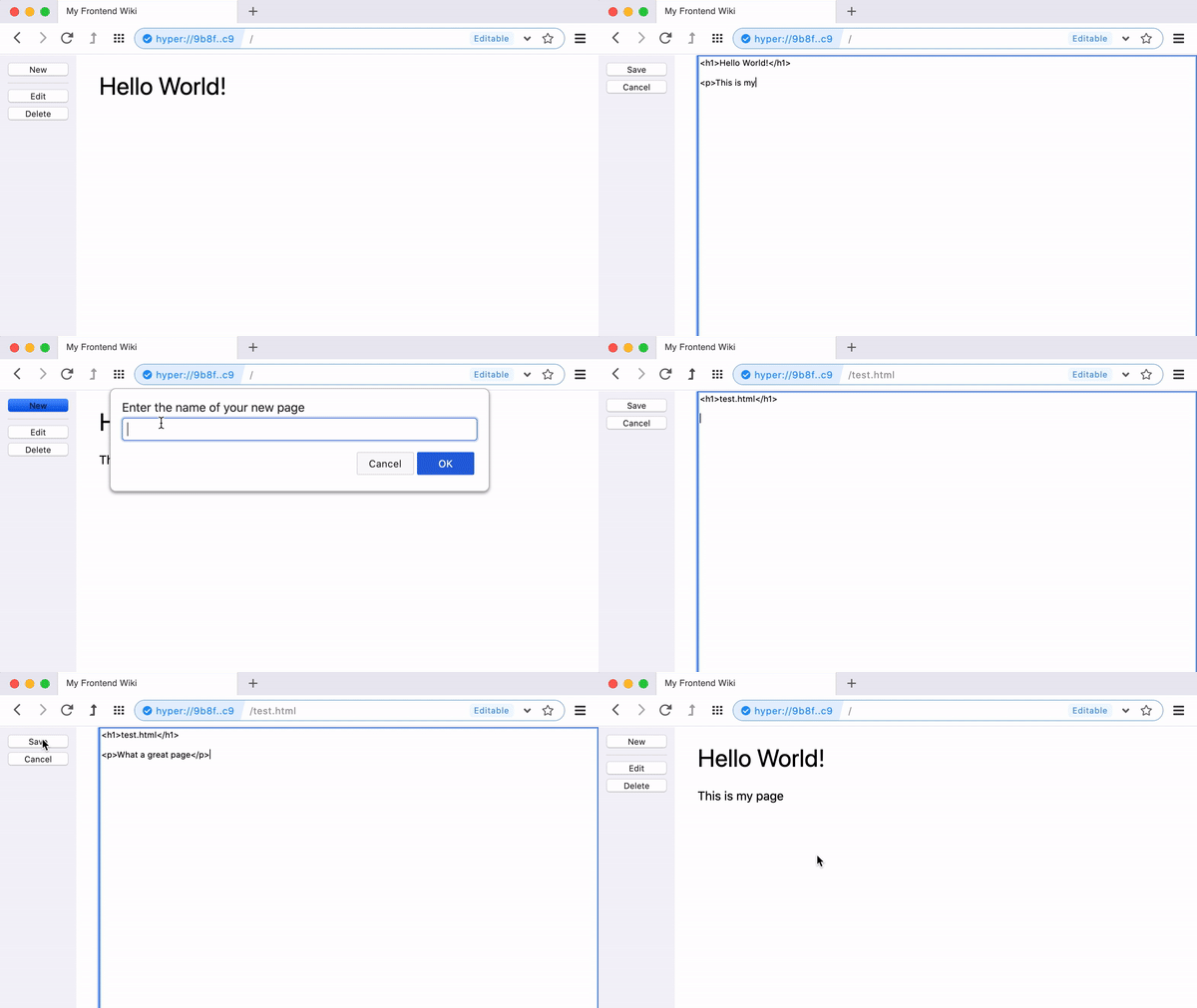
On load, our Frontend will automatically create a UI with the editor tools on the left. It will then attempt to read the file that corresponds to the current URL. If the file is found, it will insert it into the UI.
Declare the Frontend
Section titled “Declare the Frontend”A Frontend is just your /index.html, declared as the drive’s fallback in /index.json:
{ "title": "My Website", "fallback": "/index.html"}Now any page navigation that doesn’t match a real file — like /about — serves /index.html with the URL unchanged, so our app can read location.pathname and render the right page. Real files always win, which is why we’ll store page content under /pages/ and use extensionless routes: if we stored /about.html and linked to it directly, the browser would serve that raw file instead of our Frontend.
Create /index.html
Section titled “Create /index.html”Our index.html is going to include the full UI for our edit mode and view mode.
<!doctype html><html> <head> <meta charset="utf-8"> <link rel="stylesheet" href="/ui.css"> </head> <body> <nav> <div class="view-mode active"> <button class="new">New</button> <hr> <button class="edit">Edit</button> <button class="remove">Delete</button> </div> <div class="edit-mode"> <button class="save">Save</button> <button class="cancel">Cancel</button> </div> </nav> <main><!-- page content will be inserted here --></main> <textarea id="editor"></textarea> <script type="module" src="/ui.js"></script> </body></html>Note the absolute asset paths (/ui.css, /ui.js) — the shell is served for arbitrary routes, so relative URLs would break.
In our UI, there will be two modes: view mode and edit mode. We’ll toggle between the two to render the page or the editor, respectively.
Add Styles
Section titled “Add Styles”In our frontend, we’re going to put all our styles in /ui.css. I’m not going to review each style but you can see them here:
body {  font-family: -apple-system, BlinkMacSystemFont, 'Segoe UI', Roboto, Oxygen, Ubuntu, Cantarell, 'Open Sans', 'Helvetica Neue', sans-serif;
  display: grid;  grid-template-columns: 100px 1fr;  grid-gap: 30px;  height: 100%;  margin: 0;}
body > nav {  background: #f3f3f8;  height: 100%;  padding: 10px;}
body > nav .view-mode,body > nav .edit-mode,main,#editor {  display: none;}
body > nav .view-mode.active,body > nav .edit-mode.active,main.active,#editor.active {  display: block;}
body > nav button {  display: block;  width: 100%;  margin-bottom: 5px;}
body > nav hr {  border: 0;  border-top: 1px solid #ddd;}
#editor {  height: 100vh;}
Setup the UI Behaviors
Section titled “Setup the UI Behaviors”First, let’s add the code to switch between our UI modes. We’ll use a couple of helpers to make things easier to read.
const $ = (sel, parent = document) => parent.querySelector(sel)const nav = $('nav')const main = $('main')const editor = $('#editor')
async function setup () {  // register event listeners  $('button.new', nav).addEventListener('click', onNew)  $('button.edit', nav).addEventListener('click', e => enterEditMode())  $('button.remove', nav).addEventListener('click', onDelete)  $('button.save', nav).addEventListener('click', onSave)  $('button.cancel', nav).addEventListener('click', e => enterViewMode())
  // start in view mode  enterViewMode()}setup()
This code should be fairly clear. We start by registering ‘click’ handlers to all of our buttons, and then enter “view mode.”
To switch between modes, we toggle the “active” class on many of our UI elements and then populate either the <main> element or the <textarea id="editor"> element.
async function enterEditMode () {  $('.view-mode', nav).classList.remove('active')  $('.edit-mode', nav).classList.add('active')  main.classList.remove('active')  editor.classList.add('active')  editor.value = await readPage()}
async function enterViewMode () {  $('.view-mode', nav).classList.add('active')  $('.edit-mode', nav).classList.remove('active')  main.classList.add('active')  editor.classList.remove('active')  main.innerHTML = await readPage()}
Add Read/Write Methods
Section titled “Add Read/Write Methods”Reading and writing the page’s HTML is going to work like in the self-modifying site tutorial. We’ll use the nomad.fs API to read and write the files.
First, we set up some globals that we’ll reuse. The route is the (extensionless) URL path, and the file that backs it lives under /pages/:
var route = location.pathname.replace(/\/$/, '') || '/'var pathname = route === '/' || route === '/index.html' ? '/pages/index.html' : `/pages${route}.html`Our UI code already uses a readPage() method to fetch the current page’s content. This is defined using the readFile() method of the nomad.fs API.
async function readPage () { return nomad.fs.readFile(pathname).catch(e => '')}To save the page, we get the editor’s value and then write it using the writeFile() method. Afterwards, we reload the page to show the changes.
async function onSave (e) { await nomad.fs.writeFile(pathname, editor.value) location.reload()}To create a new page, we prompt the user for a page name, write a starting .html template into /pages/, and navigate to the new page’s route. The route itself has no real file, so the Frontend serves there and renders the stored content.
async function onNew (e) { var page = prompt('Enter the name of your new page') if (!page) return page = page.replace(/\.html$/, '').replace(/^\//, '') await nomad.fs.writeFile(`/pages/${page}.html`, `<h1>${page}</h1>`) location.pathname = `/${page}`}To delete the current page, we confirm with the user and then use the unlink() method. When the page reloads, the view should display nothing because a 404 is handled by inserting an empty string (see our readPage() method above).
async function onDelete (e) { if (!confirm('Are you sure?')) return await nomad.fs.unlink(pathname) location.reload()}The Final Code
Section titled “The Final Code”{ "title": "My Website", "fallback": "/index.html"}var route = location.pathname.replace(/\/$/, '') || '/'var pathname = route === '/' || route === '/index.html' ? '/pages/index.html' : `/pages${route}.html`
const $ = (sel, parent = document) => parent.querySelector(sel)const nav = $('nav')const main = $('main')const editor = $('#editor')
async function readPage () { return nomad.fs.readFile(pathname).catch(e => '')}
async function onNew (e) { var page = prompt('Enter the name of your new page') if (!page) return page = page.replace(/\.html$/, '').replace(/^\//, '') await nomad.fs.writeFile(`/pages/${page}.html`, `<h1>${page}</h1>`) location.pathname = `/${page}`}
async function onSave (e) { await nomad.fs.writeFile(pathname, editor.value) location.reload()}
async function onDelete (e) { if (!confirm('Are you sure?')) return await nomad.fs.unlink(pathname) location.reload()}
async function enterEditMode () { $('.view-mode', nav).classList.remove('active') $('.edit-mode', nav).classList.add('active') main.classList.remove('active') editor.classList.add('active') editor.value = await readPage()}
async function enterViewMode () { $('.view-mode', nav).classList.add('active') $('.edit-mode', nav).classList.remove('active') main.classList.add('active') editor.classList.remove('active') main.innerHTML = await readPage()}
async function setup () { // register event listeners $('button.new', nav).addEventListener('click', onNew) $('button.edit', nav).addEventListener('click', e => enterEditMode()) $('button.remove', nav).addEventListener('click', onDelete) $('button.save', nav).addEventListener('click', onSave) $('button.cancel', nav).addEventListener('click', e => enterViewMode())
// start in view mode enterViewMode()}setup()<!doctype html><html> <head> <meta charset="utf-8"> <link rel="stylesheet" href="/ui.css"> </head> <body> <nav> <div class="view-mode active"> <button class="new">New</button> <hr> <button class="edit">Edit</button> <button class="remove">Delete</button> </div> <div class="edit-mode"> <button class="save">Save</button> <button class="cancel">Cancel</button> </div> </nav> <main></main> <textarea id="editor"></textarea> <script type="module" src="/ui.js"></script> </body></html>body { font-family: -apple-system, BlinkMacSystemFont, 'Segoe UI', Roboto, Oxygen, Ubuntu, Cantarell, 'Open Sans', 'Helvetica Neue', sans-serif;
display: grid; grid-template-columns: 100px 1fr; grid-gap: 30px; height: 100%; margin: 0;}
body > nav { background: #f3f3f8; height: 100%; padding: 10px;}
body > nav .view-mode,body > nav .edit-mode,main,#editor { display: none;}
body > nav .view-mode.active,body > nav .edit-mode.active,main.active,#editor.active { display: block;}
body > nav button { display: block; width: 100%; margin-bottom: 5px;}
body > nav hr { border: 0; border-top: 1px solid #ddd;}
#editor { height: 100vh;}